Methods of Operation
This electric fireplace can be operated by the Fireplace Touch Control Panel located on the UPPER right corner of the fireplace, or by the battery-powered Remote Control.
Remote Control
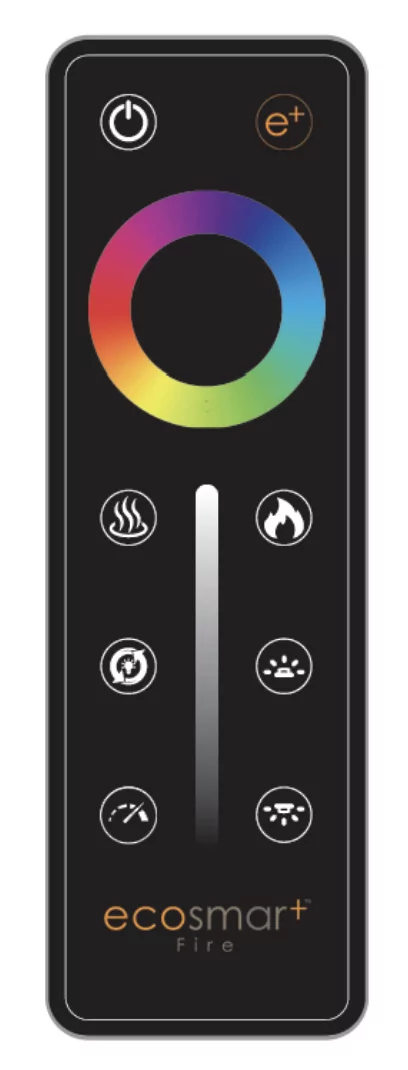
Pairing Remote or Optional Wall Mounted Touch Control
Before beginning, read pairing instructions in its entirety. Locate and familiarize yourself with the manual touch controls on the fireplace and your hand held remote. Ensure remote has a battery installed.
- On the fireplace touch controls, long press the on/off button for 3 seconds until a fast double beeping tone is heard from the fireplace. The power indicator will also flash 3 times in 1 second. This places the fireplace in RF pairing mode.
- Within 5 seconds of hearing the double beeping tone, either on the handheld remote or wall touch control, press the power button repeatedly until another beeping tone is heard along with the indicator lights flashing. This is the fireplace acknowledging that it has paired. An additional tone may also be heard; this is simply the fireplace completing the pair mode.
NOTE:
- Pairing must be done within 5 seconds or the fireplace will time out of pairing mode.
- After the initial double beep is heard, do not long press the power button on the remote/pairing device to pair as this may not be successful. Pressing the power button repeatedly is required to ensure the signal is sent from the remote/pairing device to the fireplace.
- To clear any paired remotes/devices from the fireplace, locate the reset button on the fireplace, then long press the reset button for 3 seconds. A beeping tone will indicate that the codes have been cleared. Once cleared, a new remote or wall touch control can now be paired.
Remote Control Operation
| Button | Function | Action |
| Power | This will cycle the fireplace on and off. Upon cycling power on, the fireplace will return to the settings it had when it was cycled off. | |
 | Home | If the fireplace is on, this button will act as a reset and bring all colors back to the default EcoSmart Fire’s signature color. |
 | Heat | This will cycle the heater between high, low and off. |
 | Mode | All zones of the fireplace will cycle through various demo modes - 7 & 3 color gradient/fade, 7 & 3 color jump, red/green/blue gradient. |
 | Speed | This is the speed button. Pressing will cycle the flame & ember bed speeds. Speeds: Low, Medium, Default & High. |
 | Flame | This is a zone setting. Touching this button will allow you to change the color and brightness of the flame by using the color wheel and brightness slider. |
 | Ember Bed | This is the Ember Bed light adjustment button. After pressing this button, the color ring and brightness bar will be adjusted, and only the color of the ember bed lamp will be adjusted. |
 | Downlight | This is a zone setting that controls the color and brightness of the downlight. |
 | Color Wheel | This will cycle the selected zone through the colors of the color spectrum. |
 | BrightnessBrightness | This will adjust the brightness of the selected zone. |
Fireplace Touch Control Panel
Toggle Switch
The fireplace has a main toggle switch located next to the manual controls. The toggle switch is in front of the glass on the top right side of the viewing area. When the “-” side of the toggle switch is depressed, the “O” pops up. This is the power-on state of the fireplace.

Power Indicator lights
The fireplace is equipped with Power indicator lights which are located on the upper right corner of the fireplace viewing area.

First light
When the fireplace is in the power-on state, an amber light turns on. The light shows the fireplace is energized and on stand-by for any commands. The amber light turns OFF when the fireplace is turned on and operating.

Second light
When the fireplace is powered on and the heater is set to low, the second light turns on. Light will fade away after 6 seconds.

Third light
When the fireplace is powered on and the heater is set to high, the third light turns on. Light will fade away after 6 seconds.
Manual Controls
The fireplace has manual controls located next to the toggle switch, in front of the glass on the top right side of the viewing area.

Power On/Off Button
Press once, indicator light turns off and fireplace power turns on. All functions enabled. Press again, flame turns off and fireplace goes to standby. NOTE: Long pressing this button for 3 seconds places fireplace in RF pairing mode.
Heat Button
Pressing heat button cycles the heater and blower on/off. Settings: Heater and blower OFF, Low Heat, and High Heat. Indicator light will match according to status. NOTE: On US Switch, low and high heat have the same heat output when wired for 120 V. Long Press the heater button for 5 seconds to lock/unlock the heater.
Preset Color Button
Press preset color button to cycle through the 8 preset color options. This changes color of all three zones: the flame, ember bed and down light. Colors in order of appearance: orange-red-orange-golden orange-green-aqua-blue-magenta.
Resetting Button
Clears any paired remotes/devices from the fireplace. Once cleared you can pair a new remote or wall touch control. After long pressing the reset button for 3 seconds, a beeping tone will be heard indicating that the pairing codes have been cleared.
Buzzer Tone Change
Long press the on/off and preset color button at the same time to enter the beeping tone cycle mode. Continue to long press both buttons to cycle through the 4 tone options. The tone will change every 2 seconds while releasing the buttons will act as the selection of the tone. The tones in order of appearance are; tone-1, tone-2, tone-3, and silent mode.
Important Warnings
Note
When the heater is first turned on, a slight odor may be present. This is normal and should not occur again unless the heater is not used for a long period of time.
To improve operation, aim the remote control at the front of the fireplace. Quickly pressing buttons on the remote without allowing the fireplace to complete the previous operation may result in operational errors. Allow the fireplace to complete each command before issuing another.
Remote Control Battery Information
- Remote control uses one CR2025 battery (Included)
Adding the Remote Control Battery
- Looking at the backside of the remote, find the small hole with the paperclip symbol next to it.
- Using the supplied Push Tool (or a paperclip), push the tool into the small hole until the faceplate of the remote separates from the back plate of the remote.
- Carefully remove the faceplate of the remote, ensuring the LED at the front of the remote is not damaged.
- Taking the supplied battery, find the side that has the “+” symbol on it.
- Making sure that the “+” side of the battery is facing away from the green circuit board of the remote, slide the battery into the battery holder. The “+” of the battery should match the “+” of the battery holder.
- Carefully place the faceplate back onto the magnetic back plate of the remote, starting with inserting the front of the faceplate.
Replacing the Remote Control Battery
- Follow the previous steps of adding the remote control battery to open up the remote, exposing the old battery.
- Using the Push Tool (or a paperclip), push the old battery out of the battery holder.
- Dispose of the old battery at your local hazardous material processing center.
- See section “Adding the Remote Control Battery” to add a new battery.
Temperature Limiting Control
This heater is equipped with a Temperature Limiting Control. Should the heater reach an unsafe temperature, the heater will automatically turn Off.
To Reset:
- Remove power from the fireplace. Wait 5 minutes. - Turn off the appropriate breaker at the circuit breaker box.
- Inspect the fireplace to ensure no vents are blocked or clogged with dust or lint. Using a vacuum can help clear the areas if needed.
- Turn breaker switch back ON.
- If problem continues, have the wiring and outlet inspected by a professional.